- Speech-to-text — turns your voice into text (the transcription step).
- Post-processing — an optional LLM pass that cleans up, punctuates, and formats the transcript afterwards.
Three ways to run a model
Every model — speech or post-processing — falls into one of three buckets:On-device
Runs entirely on your machine. Audio never leaves your device, works offline, and costs nothing per minute. The strongest privacy guarantee.
HyperWhisper Cloud
Built-in, no API key, no separate account. The most accurate option, billed per minute of actual speech with no markup.
Bring your own key
Plug in your own provider API key and pay that provider directly — useful if you already have credits or want a specific model.
There is no universally “best” model. On-device models are unbeatable for privacy and offline use; cloud models are noticeably more accurate on accents, noise, and technical vocabulary. The library exists so you can make that trade yourself.
Speech-to-text models
On-device
These run locally with no network calls. Once downloaded (where applicable) they work fully offline — your audio is never uploaded anywhere. See Data Privacy for details.| Model | Runs on | Languages | Why it’s here |
|---|---|---|---|
| Apple Speech | macOS (built-in) | Auto-detect | Zero download, instant, private. The fastest way to start dictating on a Mac with nothing to install. |
| NVIDIA Parakeet | macOS · Windows | English (V2) · 25 European (V3) | Fastest accurate on-device transcription for English and European languages. |
| NVIDIA Nemotron 3.5 | macOS | 6 Latin · ~40 incl. Chinese, Japanese, Korean, Arabic | Best on-device accuracy and the broadest offline language coverage — the only local option that reaches beyond European languages. |
| Whisper | macOS · Windows | 100 languages | OpenAI’s general-purpose model in many sizes (Tiny → Large). The universal fallback: runs on almost any hardware, including CPU-only and older machines. |
| Qwen3 ASR | macOS | Multilingual | An additional multilingual on-device option for users who want to try Alibaba’s ASR model. |
Whisper models
OpenAI’s general-purpose multilingual models. The VRAM values are the recommended GPU memory for full acceleration — with less, the model still runs on CPU (or partial GPU), just slower.| Model | Size | Recommended VRAM | Languages | Best for |
|---|---|---|---|---|
| Tiny | ~69 MB (macOS) / ~78 MB (Windows) | ~1 GB | Multilingual | Lowest-end machines, quick drafts |
| Tiny (English) | ~69 MB (macOS) / ~78 MB (Windows) | ~1 GB | English only | Same as Tiny, slightly better English |
| Base | 148 MB | ~1 GB | Multilingual | Light hardware, basic dictation |
| Base (English) | 148 MB | ~1 GB | English only | Same as Base, slightly better English |
| Small | 488 MB | ~2 GB | Multilingual | Best balance for most users |
| Small (English) | 488 MB | ~2 GB | English only | Same as Small, slightly better English |
| Medium | 1.5 GB | ~5 GB | Multilingual | Higher accuracy, mid-range GPUs |
| Medium (English) | 1.5 GB | ~5 GB | English only | Same as Medium, slightly better English |
| Large v3 Turbo | 1.5 GB | ~6 GB | Multilingual | Near-Large accuracy, much faster |
| Large v2 | 3.1 GB | ~10 GB | Multilingual | Highest Whisper accuracy (older) |
| Large v3 | 3.1 GB | ~10 GB | Multilingual | Highest Whisper accuracy (latest) |
NVIDIA Parakeet models
NVIDIA Parakeet models are typically faster than equivalent-size Whisper models and very accurate for the languages they support.| Model | Size | Languages | Best for |
|---|---|---|---|
| Parakeet V2 (English) | 474 MB | English only | Fastest accurate English transcription |
| Parakeet V3 (Multilingual) | 494 MB | 25 European languages | Multilingual European dictation |
On Windows, Parakeet runs on both x64 and ARM64, while Whisper is currently x64-only. If you’re on a Snapdragon / ARM Windows device, choose Parakeet.
NVIDIA Nemotron 3.5 models
NVIDIA’s Nemotron 3.5 ASR is the newest on-device option (macOS). It edges out the other local models on accuracy and reaches well beyond European languages — the multilingual variant is the only local model that handles Chinese, Japanese, Korean, and Arabic.| Model | Size | Languages | Best for |
|---|---|---|---|
| Nemotron 3.5 (Latin) | ~350 MB | English, Spanish, French, Italian, Portuguese, German | Smaller, faster Latin-script transcription |
| Nemotron 3.5 (Multilingual) | ~1.3 GB | ~40 languages incl. Chinese, Japanese, Korean, Arabic | Broadest offline language coverage |
Apple Speech & Qwen3 ASR
- Apple Speech is built into macOS — no download, available the moment you launch the app. It’s the quickest private option for everyday Mac dictation. (Requires a recent macOS version.)
- Qwen3 ASR is an additional multilingual on-device model (macOS) for users who want to try Alibaba’s ASR.
Offline language coverage at a glance
Not sure which local model handles your language? This table maps the common use-cases. For the full Parakeet V3 and Nemotron language lists, see the sections above.| Language / region | Best offline option | Also works |
|---|---|---|
| English | Parakeet V2 or V3, Nemotron Latin | Whisper (any size) |
| Spanish, French, Italian, Portuguese, German | Nemotron Latin, Parakeet V3 | Whisper |
| Other European (Polish, Czech, Dutch, etc.) | Parakeet V3 | Whisper |
| Chinese, Japanese, Korean, Arabic | Nemotron Multilingual | Whisper Large |
| 100-language general coverage | Whisper Large v3 | — |
| macOS, fastest start, no download | Apple Speech | — |
Nemotron is macOS-only. Parakeet and Whisper run on both macOS and Windows. See individual sections above for details.
HyperWhisper Cloud
HyperWhisper Cloud is built-in — no API key, no separate account. It routes to best-in-class providers behind four accuracy tiers, and you only pay for actual speech (silence and empty recordings cost 0 credits). Use it when you want the highest accuracy without any setup.| Tier | Powered by | Best for |
|---|---|---|
| Highest | ElevenLabs Scribe v2 | Accents, noisy audio, technical vocabulary |
| High | Grok STT (xAI) | Solid multilingual accuracy at low cost |
| Medium | Deepgram Nova-3 | Strong English accuracy, low latency |
| Fast | Groq Whisper Large v3 | Sub-second latency for English & major European languages |
Bring your own key
If you already hold API credits, want a provider’s free tier (Deepgram $200, AssemblyAI $50), or need a specific model, plug in your own key under API Keys. You pay the provider directly at their published rate. Supported providers for bring-your-own-key transcription: OpenAI · Groq · Deepgram · AssemblyAI · ElevenLabs · Mistral · Soniox · Google GeminiWhen you bring your own key, opting your audio out of model training is your responsibility — each provider has its own setting. See Data Privacy for a copy-pasteable prompt that finds the current opt-out for any provider.
Post-processing models
Post-processing is an optional second step: after transcription, an LLM cleans up filler words, fixes punctuation and capitalization, and applies any formatting your mode asks for. It’s separate from the speech model — you can mix any speech model with any post-processing model.Cloud post-processing
Available built-in through HyperWhisper Cloud (no key needed) or with your own API key.| Provider | Bring-your-own-key needed? | Character |
|---|---|---|
| HyperWhisper Cloud | No | Built-in, credit-based |
| OpenAI | Yes | GPT-4.1 and GPT-5 family; fast and accurate |
| Anthropic (Claude) | Yes | Claude Haiku and Sonnet; high quality reasoning |
| Google Gemini | Yes | Gemini Flash and Pro; efficient, multilingual |
| Groq | Yes | Ultra-fast inference via GPT OSS and Llama 4 models |
| xAI (Grok) | Yes | Grok 4.3; high-accuracy with low latency |
| Cerebras | Yes | Ultra-fast inference; GPT OSS, Qwen, and Z.ai models |
| Mistral | Yes | Multilingual-friendly; Mistral Small and Nemo |
Local LLM post-processing
Local Gemma 4 models clean up and format transcript text fully offline after download — your text never leaves your device. The local LLM is powered by a bundled llama.cpp server that starts automatically when the mode needs it. Platform availability:- macOS
- Windows
Local LLM post-processing is available on Apple Silicon Macs (M1 and later). The llama.cpp server runs via Metal GPU acceleration. Intel Macs do not support local LLM post-processing — cloud post-processing providers are available as an alternative.
| Model | Size | Recommended RAM | Best for |
|---|---|---|---|
| Gemma 4 E2B (Recommended) | 3.1 GB | ~4 GB | Best balance of speed and quality for most Macs |
| Gemma 4 E4B | 5 GB | ~6 GB | Higher quality cleanup |
| Gemma 4 12B | 7.1 GB | ~10 GB | Mid-size dense model, good for 16 GB Macs |
| Gemma 4 26B MoE | 16.9 GB | ~18 GB | Mixture-of-experts for capable machines |
| Gemma 4 31B Dense | 18.3 GB | ~20 GB | Highest local quality, slowest |
Rating scale
Every model in the library — speech-to-text and post-processing — shows a Speed bar and an Accuracy bar, each rated 1–5. The numbers come from an internal benchmark suite run over real recordings (results inbenchmarks/results/).
| Rating | Speed (p50 latency) | Transcription accuracy (avg WER) | Post-processing accuracy (WER vs reference) |
|---|---|---|---|
| 5 | < 700 ms | < 5% | < 8% |
| 4 | 700 ms – 2 s | 5 – 8% | 8 – 15% |
| 3 | 2 – 3.5 s | 8 – 12% | 15 – 25% |
| 2 | 3.5 – 5.5 s | 12 – 18% | 25 – 40% |
| 1 | > 5.5 s | > 18% | > 40% |
Using on-device models
Downloading & storage
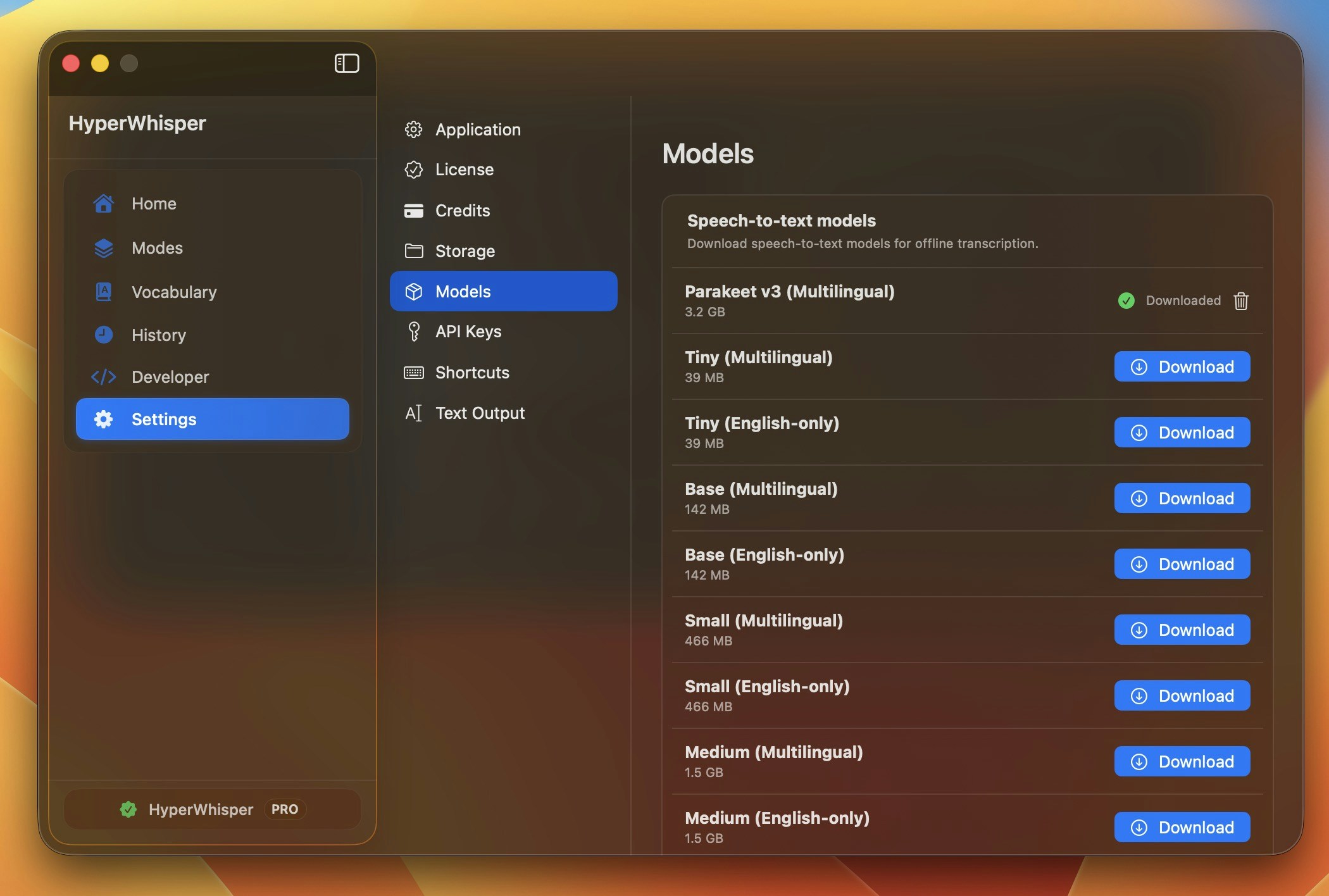
Open Model Library in the app, click Download on any entry, and watch the circular progress indicator. You can cancel mid-stream with the× button. Downloaded models stay on disk until you remove them.
| Platform | Storage location |
|---|---|
| Windows | %LOCALAPPDATA%\HyperWhisper\Models\ |
| macOS | ~/Library/Application Support/hyperwhisper/models/ |
GPU vs CPU
Local engines use your GPU when available and fall back to CPU automatically if you don’t have a dedicated GPU or there isn’t enough VRAM. The model still runs on CPU — it’s just slower.| Engine | Backend | GPU support | CPU fallback |
|---|---|---|---|
| Whisper (Windows) | WhisperNet / DirectCompute | NVIDIA, AMD, Intel (any DirectX 11 GPU) | Yes |
| Whisper (macOS) | libwhisper / Metal | Apple Silicon GPU + Neural Engine | Yes |
| Parakeet (Windows) | sherpa-onnx / DirectML | NVIDIA, AMD, Intel | Yes |
| Parakeet (macOS) | sherpa-onnx / CoreML | Apple Silicon | Yes |
| Nemotron (macOS) | FluidAudio / CoreML | Apple Silicon | Yes |
| Local Gemma post-processing (macOS) | llama.cpp / Metal | Apple Silicon (M1+) | No (Intel Macs not supported) |
| Local Gemma post-processing (Windows) | LLamaSharp / GGUF | NVIDIA CUDA (x64 only) | Yes (CPU — x64 and ARM64) |
Removing models
To free up disk space, click the trash icon next to any downloaded model in Model Library. The file is removed immediately and can be re-downloaded any time.Which should I pick?
Privacy is non-negotiable / offline
An on-device speech model. Apple Speech for instant Mac dictation, or Parakeet / Nemotron for higher accuracy. Audio never leaves your machine.
I want the best accuracy, no setup
HyperWhisper Cloud — Highest (ElevenLabs Scribe v2). No API key, pay only for speech.
I speak a non-European language, offline
Nemotron 3.5 (Multilingual) — on-device coverage for Chinese, Japanese, Korean, Arabic, and ~40 languages total.
Older laptop / no dedicated GPU
Whisper Tiny or Small — runs comfortably on CPU. For longer audio, switch to HyperWhisper Cloud.
English only, want it fast & local
Parakeet V2 (English) — typically faster than equivalent Whisper with comparable accuracy.
I already have a provider key
Bring your own key — plug it in and pay the provider directly. See API Keys.
Boost accuracy on any model
- Custom vocabulary — add product names, jargon, and colleagues’ names. The single biggest improvement for technical or professional use. (Support varies by model — Apple Speech and Whisper support it locally; among cloud providers most do, a few don’t.)
- Low-noise environment — every model degrades with background noise. See Best Practices.
- Natural pace — speech that’s too fast or too slow both hurt accuracy.
Go deeper
Providers
HyperWhisper Cloud tiers, per-minute pricing, cost examples, and accuracy by language.
API Keys
Set up bring-your-own-key access for any supported provider.